
How to Manage Restaurant Inventory - Complete Guide

Updated: Sep 14
Most restaurant owners don't lose money in one dramatic moment. They lose it a few ounces at a time - an over-poured cocktail here, a case of produce that turned before anyone touched it there, a Saturday rush cut short because the walk-in ran dry mid-service. None of it feels like much on its own. Added up over a year, it's often the difference between a profitable kitchen and one that just breaks even.
That's what makes inventory such an underrated part of the business. It rarely gets the attention that menu design or marketing does, yet it quietly decides how much of every dollar you actually keep. And with ingredient prices refusing to sit still, the restaurants that treat inventory as a discipline - not a monthly chore - are the ones pulling ahead.
This guide walks through the whole thing: how to buy, receive, store, count, and read your stock, and how software takes most of the manual work off your plate. Consider it a field manual for turning a back-of-house headache into one of your sharpest profit tools.
Overview
Sloppy inventory quietly inflates your costs. A large share of the food restaurants buy never makes it onto a plate, and as prices climb, tightening even a few habits moves real money to the bottom line.
It's a loop, not a list. Buying, receiving, storing, using, counting, and analyzing all feed each other. Handle them as one connected cycle and each step gets easier.
The right software compounds over time. Live stock levels, par-based reordering, recipe costing, and rolling average cost don't just save an afternoon a week - they steadily sharpen your margins, your forecasts, and your food cost.
Every concept is a little different. A bar lives and dies by pour cost, a quick-service brand by consistency across sites, a café by transfers and real-time pricing. The fundamentals - count, forecast, watch your variance - hold everywhere.
Habits That Keep Inventory Under Control
Ask ten operators about inventory and most will describe the same tug-of-war: vendors you can't fully predict, prices that drift upward, waste you can feel but can't quite pin down, and a kitchen that has to keep firing through all of it. It's a lot to hold in your head.
You don't have to hold it in your head. A handful of habits does most of the work:
Let your POS carry the load. When sales data flows straight into your stock counts, the tedious parts - deducting what sold, refreshing item prices, keeping a running theoretical usage - happen on their own. Cactus handles this quietly in the background, so you're never counting from a blank sheet.
Count on a rhythm, not a whim. Guessing at stock levels is how over-ordering starts. Pick a cadence - weekly on your expensive, fast-moving items, monthly on the full shelf - and stick to it. Because Cactus lets you count out loud as you walk the line, a full count is minutes of work rather than an evening lost to a clipboard.
Read the numbers you're already collecting. Your usage history, waste log, and sales mix are telling you where to order more carefully, what to feature, and what to cut. The data's there; the habit is looking at it.
Watch the gap. The distance between what your recipes say you should have used and what you actually used is called variance - and it's usually where the leaks are hiding.

See how Cactus automates the whole cycle. Book a demo →
Buying, Receiving and Storing Without the Guesswork
Ordering is a balancing act. Buy too much and you're paying to refrigerate food you'll eventually throw out; buy too little and you're apologizing to a table for the dish they came in for. Getting the quantity right, consistently, is one of the quiet skills that separates a well-run kitchen from a stressed one.
A few things help:
Order to a plan, not to panic. Set your order frequency around three things: how much you can store, how fast you sell, and how quickly each item goes off. Cactus flags what's dropping below par and assembles the next order for you, so restocking stops being a task you dread.
Treat vendors as partners, not order-takers. The suppliers who show up on time with what they promised are worth investing in - and it's worth lining up a backup for the day one of them can't deliver.
Check every delivery against the paperwork. Short counts, swapped items, and quality slips are easiest to catch at the door. Since Cactus has already read and logged the invoice, your team has something concrete to check the delivery against.
Store so nothing gets forgotten. Label, date, and rotate on a first-in, first-out basis. Most spoilage isn't bad luck - it's product that got pushed to the back and lost.
Every invoice, captured automatically. Cactus reads each invoice the moment it arrives and sorts every line item - food, beverage, or supplies - straight into your inventory. Learn more about invoice processing →
What to Look For in Restaurant Inventory Software
If your inventory still lives in a spreadsheet and a stack of receipts, software is the upgrade that pays for itself fastest. But not every tool earns its keep. Here's what's worth holding out for:

Here's what to look for when comparing tools:
Live tracking. Stock levels that reflect reality right now, so a looming shortage shows up as a heads-up instead of a surprise.
Reordering that runs on par levels. Set the floor for each item and let the system tell you what to buy - and draft the order - rather than reconstructing it from memory every week.
Real per-plate costing. The true cost of a dish includes yield, portion, and every house-made component. Good software works that out for you, sauces and prep included.
Rolling average cost. Prices shift with every delivery. Averaging cost across recent purchases — instead of trusting whatever the last invoice happened to say - is how you catch a slow price climb before it quietly eats your margin.
A live COGS number. Your cost of goods should be ready whenever your accountant asks, not reconstructed at month-end. Bonus points if it syncs straight to QuickBooks.
Counting that fits how you work. Whether that's your phone in the walk-in or your voice as you move down the shelf, counting shouldn't mean re-typing everything later.
See it in action. Book a Cactus demo → — no signup needed.
Where the Payoffs Show Up
A capable inventory system isn't a nice-to-have anymore; it's the machinery behind a healthy P&L. Here's where you actually feel it.

Healthier Margins
Counting stock is the visible part. The value is what the counting unlocks: fewer things bought that didn't need buying, less product aging out in the back, and a team spending its hours on guests instead of clipboards. Cleaner data also gives you real footing with suppliers - it's a lot easier to ask for a better price when you can show exactly what you use.
Sharper Forecasting
Your own history is a decent crystal ball once you can actually read it. Pull together past sales, current momentum, and the calendar - a home game, a holiday, a long weekend - and next week's order becomes a calculation instead of a hunch. The same view tells you which dishes are turning inventory fast and which are just tying up cash on the shelf.
Tighter Food Costing
Roughly a third of what a restaurant takes in goes back out the door as food, which is exactly why the number rewards attention. With the right system you can cost each dish down to the ingredient, surface the quiet gap between expected and actual usage, stay ahead of price swings, and negotiate from data rather than gut feel.
Purchasing that Manages Itself
The chase - phoning suppliers, rebuilding orders, hunting down an invoice - is mostly avoidable. Reordering keyed to your par levels refills stock on its own, orders generate themselves, and vendor history sits in one place so comparing prices is a glance, not a project. Fewer hands on the process means fewer mistakes in it.
Recipes that Stay Consistent
A dish is only as reliable as the recipe behind it, and reliability gets hard when staff turn over and prices move. Tie your recipes to your inventory and every plate is both standardized and costed: the same measurements no matter who's on the line, an honest read on whether a special actually makes money, and house-made items - your salsa, your stocks, your prep costed from raw ingredients up and re-costed automatically when prices change.
Know the true cost of every ingredient, every day. See how rolling average cost works →
A Lower Cost of Goods
Bringing your COGS down isn't about buying cheaper across the board - it's about buying and using smarter. Accurate counts curb over-ordering and spoilage. Organized vendor management opens the door to bulk and seasonal pricing. Recipe costing shows you which items to reprice or rework. Consistent portions keep waste in check. And clear reporting points you straight at the costliest offenders. With Cactus, that COGS number is calculated as you go and ready to hand off - no scramble when the books close.
Inventory Management vs. Stock Management
The two terms get swapped around, but they describe different jobs.
Inventory management is the wide-angle view - everything moving in and out of the building, how much you're holding, when to reorder, and how to avoid both shortfalls and waste. It's fundamentally about planning.
Stock management is the hands-on half — receiving, storing, rotating, and counting what's already arrived so it stays fresh and accounted for.
You need both, and they reinforce each other. One tells you what to do; the other makes sure it actually gets done on the floor.
Managing Food Inventory
With costs up and kitchens often short-staffed, staying on top of food specifically has never mattered more. Stripped down, it's knowing what you're bringing in, how you're holding it, and how it's being used - so you've always got what the menu needs without freezing cash in the walk-in.
A handful of terms come up again and again:
Sitting inventory - what's on hand right now, counted in weight, volume, or dollars.
Shelf-to-sheet - reconciling what's physically on the shelf against what your system says should be there.
Depletion - how fast you're going through something, and what that predicts for the next order.
Yield - how much of an ingredient is actually usable once it's trimmed or prepped, which quietly shapes real food cost.
Variance - the difference between expected and actual usage, and the single most useful thing to keep an eye on.
That last one is worth dwelling on. The space between theoretical and actual usage is where over-portioning, spoilage, and shrinkage all show up. Watching it closely is one of the highest-return habits in the entire operation.
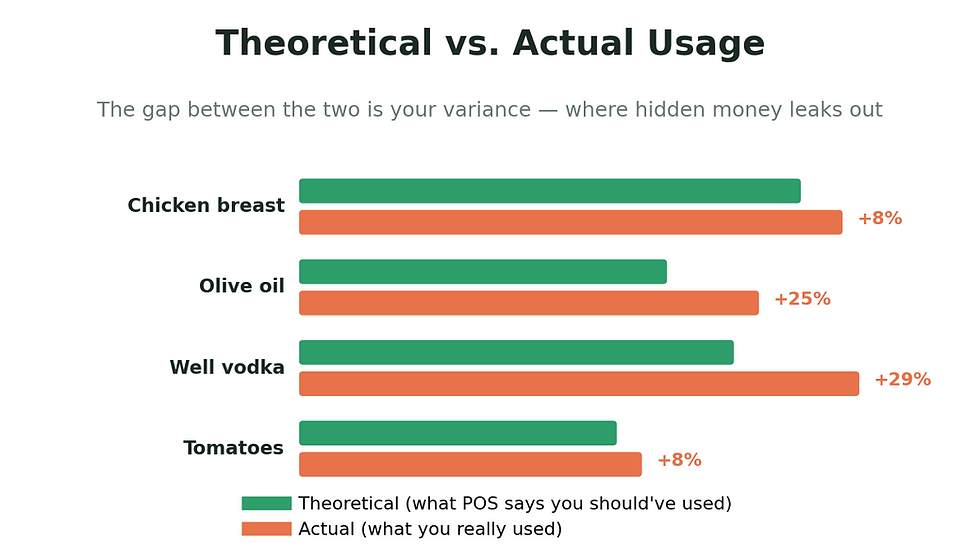
That gap between theoretical and actual is where waste, over-portioning, and shrinkage hide. Watching it closely is one of the highest-return habits in the whole business.
Spreadsheet or App?
For a small kitchen just getting organized, a spreadsheet is a reasonable place to begin - it's cheap and familiar. Its limits show up fast, though: it's slow to fill in, easy to fat-finger, and it goes out of date the second a price changes. Worst of all, it can't warn you about anything; you find out you're out of something when you reach for it.
An app closes those gaps. It tracks in real time, cuts the manual errors, ties into your POS, and reorders on its own. With Cactus, counting isn't even data entry anymore - you say what you see and it's logged.

Count inventory with your voice. Walk your kitchen, say what you see, and Cactus updates your counts automatically. Learn more →
Bar and Beverage Inventory
Your bar deserves at least as much rigor as your kitchen - arguably more, since liquor is both high-value and unusually easy to lose track of. A steady handle on stock, pour cost, and waste protects margins that don't have much room to give.
The core of it comes down to a few things: knowing your levels on the bottles that move fast or cost the most, watching which drinks actually sell so you're ordering to demand rather than habit, keeping an eye on the pours, spills, and quiet losses that thin out profit, and letting real numbers - not a hunch - shape the next order.
Cactus handles beverage the way it handles food: wine by the bottle, spirits by the size, beer by the case, with support for ounces, pints, bottles, and more, plus a separate beverage view whenever you want to look at the bar on its own.
Give your beverages the same system as your food. Explore beverage management →
Running Inventory Across Multiple Locations
Add a second location and the complexity more than doubles - separate par levels, different vendors, and stock that has to move between kitchens. Without a single live view, it's easy to overstock one site while another sits empty.
What you want from a multi-site setup is real-time visibility from one dashboard, transfers between locations that track themselves, par levels tuned to each kitchen with alerts to match, and recipe costing that stays consistent so a dish costs what it's supposed to no matter where it's plated.
See what's in every kitchen, from anywhere. Explore multi-location tracking →
For the Manager on the Floor
If you're running the shift, inventory is competing with a hundred other things for your attention. It's worth winning that competition, because few things move food cost as directly. A short list keeps it manageable:
Wire it to your POS so tracking mostly takes care of itself and errors have fewer places to hide.
Count the expensive stuff often — the more frequently you check high-cost items, the sharper every order gets.
Keep a waste log and actually read it; patterns in what's getting tossed tell you where to look.
Rotate first in, first out so older product moves before it turns.
Glance at COGS regularly to catch a problem while it's still small.
Forecast off your own history instead of reacting after you've already run short.
Compare actual to theoretical to surface the inefficiencies that don't announce themselves.
The payoff of doing this with software: once invoice capture, POS-driven usage, low-stock alerts, and COGS are all running on their own, the only recurring job left for your team is a quick count - which, by voice, takes minutes.
Restaurant Inventory Management FAQs
What is restaurant inventory management? It's the practice of keeping track of every food, beverage, and supply item a restaurant buys, stores, and uses - from the moment you order it through receiving, storage, usage, and cost analysis.
How is it different from stock management? Inventory management is the planning side: what's moving in and out and when to reorder. Stock management is the physical side: organizing, storing, and rotating what's already on hand.
How often should we count? Regularity beats frequency. Many operators do a full count monthly and hit their high-cost, fast-moving items weekly. When counting takes minutes by voice, there's little reason to let it slide.
What features matter most in inventory software? Live tracking, par-based reordering, recipe and food costing, rolling average cost, a live COGS figure, and counting that works from your phone or your voice.
How does inventory affect food cost? It's how you cost recipes accurately, spot the gap between theoretical and actual usage, keep up with price swings, and negotiate from evidence - all of which pull your cost of goods in the right direction.
What is variance, and why should I care? Variance is the difference between what you expected to use and what you actually used. Tracking it points you straight at waste, over-portioning, or shrinkage before it does real damage to your margin.
What does inventory software cost? Cactus starts at $49/month per location (Starter: invoice tracking, food and prime cost, recipe management, inventory, waste tracking, and POS integration). The Growth plan is $149/month and adds accounting integration, automated reordering, and sales and inventory forecasting. No minimum commitment - monthly billing, cancel whenever. See pricing →
Wrapping Up
Good inventory management isn't glamorous, but it's one of the most dependable ways to protect what you earn. Stay on top of your costs, keep waste in check, lean on tools built for the job, and the decisions that used to feel like guesses start to feel obvious. It's consistency, more than anything, that separates the kitchens that fight food cost from the ones that quietly win at it.
The real shift is that none of it has to be done by hand anymore. Cactus reads your invoices, tracks usage through your POS, warns you before you run low, drafts the next order, and keeps a live COGS ready to go - leaving your team with little more than a quick count, done out loud.
Want to see what your inventory looks like when it mostly runs itself?
DISCLAIMER: This information is provided for general informational purposes only, and publication does not constitute an endorsement. Cactus does not warrant the accuracy or completeness of any information, text, graphics, links, or other items contained within this content. Cactus does not guarantee you will achieve any specific results if you follow any advice herein. It may be advisable for you to consult with a professional such as a lawyer, accountant, or business advisor for advice specific to your situation.


